Targeting and timing
When a popup opens, how often, on which pages, and for whom.
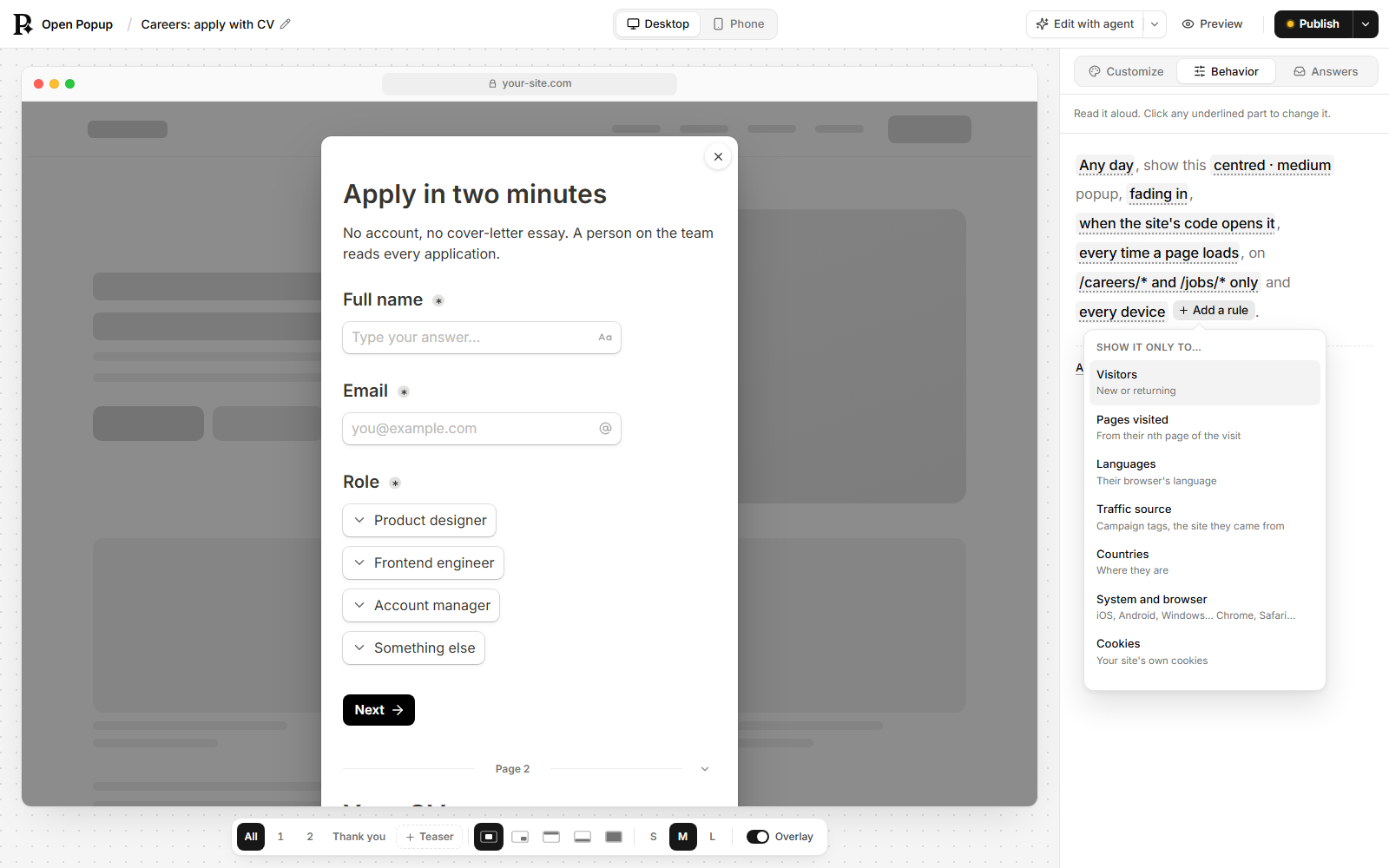
Every popup carries its own rules for when it opens and who sees it. They all live in the popup part of the popup document, and in the builder they’re the Behavior tab, which reads them back as one sentence: “Shows after 10 seconds, once a week, on every page.” Each underlined part of the sentence is a control, and Add a rule adds an audience rule.
A popup opens only when all of its rules allow it. The script on your page checks them in the visitor’s browser, so nothing is sent anywhere to decide.
When it opens: the trigger
"trigger": { "kind": "delay", "seconds": 10 }kind | Also takes | Opens |
|---|---|---|
immediate | Nothing. | As soon as the page loads. |
delay | seconds, 0 to 600. | After that many seconds on the page. |
scroll | percent, 1 to 100. | Once the visitor has scrolled that far down the page. |
exit-intent | Optionally fallbackDelaySeconds and maxDelaySeconds. | When the mouse heads out of the top of the window, as if to close the tab. |
click | selector, such as #book-a-demo or .size-guide-link. | When the visitor clicks something on your page that matches the selector. |
manual | Nothing. | Never by itself. Your page’s JavaScript opens it with window.openpopup.show("<popup id>"), or its teaser does. |
Exit intent on phones. A phone has no mouse to leave with, so there an exit-intent popup opens after fallbackDelaySeconds instead: 20 seconds unless you set it (0 to 600).
Exit intent that doesn’t wait forever. On a computer, a visitor who never heads for the tab bar never sees an exit-intent popup. maxDelaySeconds (1 to 600) opens it after that many seconds if they haven’t headed for the exit by then, whichever comes first.
Opening from your own code. Any popup can be opened with window.openpopup.show, whatever its trigger. See Open a popup from your own code.
How often: the frequency
"frequency": { "kind": "days", "days": 7 }The frequency is remembered in each visitor’s browser.
kind | Shows |
|---|---|
always | On every page load. Right for a popup opened by a click. |
once | Once, ever, in that browser. |
session | Once per visit. |
days | Once every so many days, 1 to 365. |
until-closed | On every page load until the visitor closes it with the ×, Escape or a click outside. Suits an announcement bar. |
Any of them can also take maxViews, from 1 to 100: the popup stops for good after that many shows in that browser. { "kind": "session", "maxViews": 3 } shows once per visit, three visits at most.
After a submit, a popup doesn’t show to that visitor again, with two exceptions: a popup opened by a click keeps opening, and one on days comes back that many days after the submit.
A click-triggered popup wants always. With any other frequency the button stops working after the first time.
Which pages
"pages": { "include": ["/blog/*"], "exclude": ["/blog/archive/*"] }include shows the popup only on matching pages; exclude keeps it off them, and wins over include. Left out, the popup shows on every page.
- A pattern is a path that starts with
/, such as/pricing. A full address likehttps://example.com/pricingis refused. *matches any run of characters, so/blog/*is every post and/*/checkoutis a checkout under any path.- Only the path is matched: a pattern can’t contain
?or a#anchor. The exception is a hash route of a single-page app, such as/#/cart. - Matching ignores case and a trailing slash, and
/ürünlermatches however the browser spells it. - At most 20 patterns, each up to 200 characters.
Which devices
"devices": "mobile" shows the popup only on touch screens with no mouse, such as phones and most tablets, and "desktop" only on devices with a mouse or trackpad. A tablet with a trackpad attached counts as desktop. Left out, or "all", it shows on both.
When it runs: the schedule
"schedule": { "start": "2026-11-27T00:00:00-05:00", "end": "2026-12-01T00:00:00-05:00" }Outside the window the popup doesn’t open. Either end can be left out. Each time needs its time zone (Z or an offset such as -05:00), so the sale ends at the same moment for everyone, wherever they are.
A visitor who has the page open when the schedule starts sees the popup on their next page.
A countdown
"countdown": { "until": "2026-12-01T00:00:00-05:00", "after": "h1", "atZero": "close" }A ticking timer inside the popup, counting down to until.
| Field | Means |
|---|---|
until | The moment it counts down to, with its time zone. |
after | The id of the block it sits under. The words that go with it are an ordinary text block above it. Left out, it sits above the first block. |
size | sm, md or lg. Left out, it is small on a bar and medium elsewhere. |
units | false hides the unit names (“hr”, “min”) under the numbers. |
atZero | What an open popup does at zero: close, hide-timer (the rest stays) or keep (stays on zeros, the default). |
The countdown only changes a popup that’s already open. To stop showing the popup to new visitors after the deadline, set schedule.end to the same time.
Who sees it: the audience
"audience": {
  "visitor": "returning",
  "country": ["DE", "AT", "CH"],
  "utm": { "campaign": ["black-friday"] }
}
Every rule you set must hold. Left out, the popup shows to everybody.
| Rule | Shows the popup to |
|---|---|
visitor | new (their first visit to your site) or returning (a later one). |
minPages | Visitors on at least their nth page of this visit, counting the current one. 1 to 100. |
languages | Visitors whose browser’s first language is one of these, written as two or three letters: ["de", "tr"]. de covers de-AT too. |
utm | Visits that arrived with these campaign tags: { "source": [...], "medium": [...], "campaign": [...] }. Each value is matched exactly, ignoring case. |
referrer | Visits that came from a site whose address contains one of these words, or notContains any of them: { "contains": ["google."] }. |
country | Visitors in these countries, as two-letter codes: ["TR", "DE"]. A visitor whose country can’t be told doesn’t see it. |
os | ios, android, windows, macos, chromeos or linux. |
browser | chrome, safari, firefox, edge, opera or samsung. |
cookies | Conditions on your site’s own cookies, all of which must hold: { "name": "logged_in", "op": "missing" }. op is exists, missing, equals (with a value) or contains (with a value). |
The campaign tags and the referrer are the ones the visit started with, so a visitor who arrived from a campaign still counts as from it three pages later.
The audience rules, the schedule and the device rule are checked by a small extra file (about 2 kB) that the script fetches only when a popup on the site has one of them.
Language
"language": "tr" says which language you wrote the popup in, as a tag such as de, pt-BR or ar. The popup’s own words then follow it: validation messages, the date and dropdown prompts, the countdown’s units and the Copy button. Arabic, Hebrew, Persian and Urdu also turn the popup right to left. Left out, those words are English.
This is not a rule about who sees the popup. To show a popup only to visitors who read German, use the audience rule languages.
Bars that push the page
On a bar-top or bar-bottom popup, "push": true moves the page out of the way instead of covering it, for as long as the bar is open. A header your site pins in place (position: fixed or sticky) doesn’t move with it; your agent’s audit_popup points that out.
Sending events to your analytics
"analytics": { "dataLayer": true, "gtag": true, "metaPixel": true }Each switch is off unless you turn it on. The popup then tells your site’s own analytics when it is shown, reaches a step, is submitted, is clicked through and is closed, as the events openpopup_show, openpopup_step, openpopup_submit, openpopup_click and openpopup_close. Each event carries the popup’s id and name, never an answer or anything the visitor typed.
| Switch | Sends to |
|---|---|
dataLayer | Google Tag Manager, as { event, openpopup_id, openpopup_name }. Only where a GTM container runs. |
gtag | Google Analytics through gtag("event", …). Skipped when GTM already got the event, so nothing counts twice. |
metaPixel | The Meta Pixel, through fbq("trackCustom", …). |
A tool your page doesn’t have is skipped silently.
Several popups on one page
Only one popup that takes over the screen is open at a time. Others wait their turn, highest priority first, while bars and corner popups without an overlay sit beside it. Several popups on one page has the details, and how single-page apps are handled.
Teasers share the page the same way: only one pill sits at each spot (bottom left, bottom centre, bottom right, the left edge, the right edge). When two popups put their teaser in the same place, the higher-priority popup’s pill shows, and the other takes its place once the first goes, because the visitor opened that popup, hid its pill, or it no longer applies. To show both at once, give them different positions.